
Instalar la app
Cómo instalar la app en iOS
Sigue el video a continuación para ver cómo instalar nuestro sitio como una aplicación web en la pantalla de inicio.
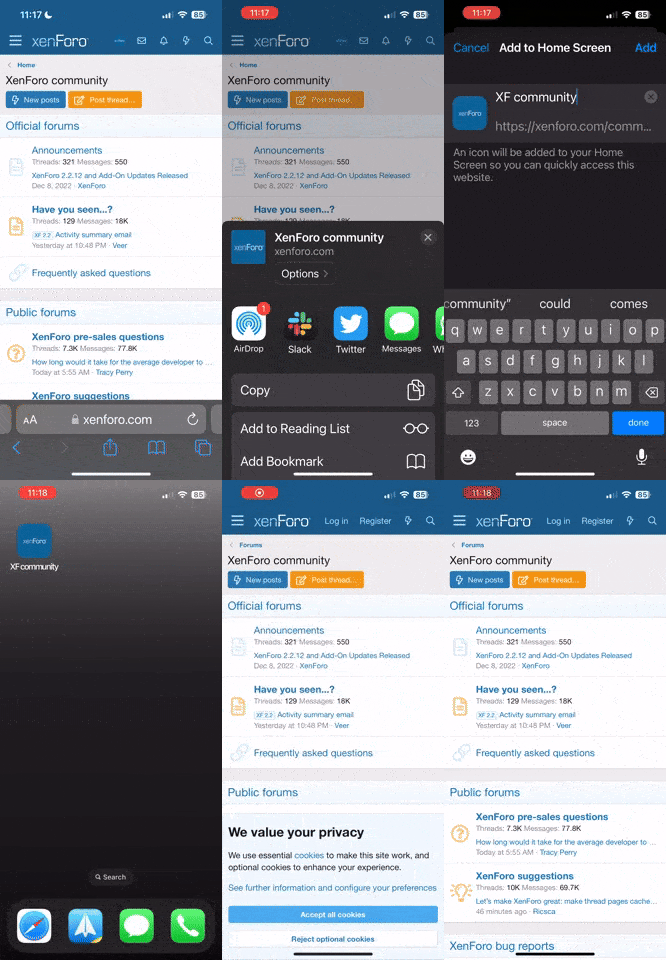
Nota: Esta función actualmente requiere acceder al sitio usando el navegador Safari integrado.
- Inicio
- Foros
- Zona Android
- Otras marcas de móviles
- Cubot
- Otros móviles Cubot
- Cubot GT99 MTK6589
- ROMs Cubot GT99
Estás usando un navegador obsoleto. Puede no mostrarse este u otros sitios web correctamente.
Debes actualizarlo o usar un navegador alternativo.
Debes actualizarlo o usar un navegador alternativo.


Hola a todos... He hecho lo de recovery.img y lo he reiniciado en modo recovery le dado a backup asecas y abajo pone "Can't mount backup path" y le he dado a "backup to internal SDcard" y parece que lo ha hecho y tal... pero luego busco en la SD y en la carpeta de los backups tengo uno que hice del otro movil... de este nada... Y la aplicacion CWM no la tengo... nose si esque no sale o nose... Alguno me puede orientar??
EDITO: el backup estaba en una "SD" interna del movil. Lo que no entiendo es porque no me la hace en la SD externa del tiron... 1,08Gb nose si es tamaño normal.
EDITO: el backup estaba en una "SD" interna del movil. Lo que no entiendo es porque no me la hace en la SD externa del tiron... 1,08Gb nose si es tamaño normal.

jimal
Platino
Cannibal Open Touch Recovery 2.1.3
Today I finished porting this recovery for GT99. It's a recovery based on CWM 6.0.3.4 with touch support. It also supports Advanced backup and Advanced restore so you can select the items that will be backed up or restored.
Download Link
Intallation
-Copy the file you downloaded on the root folder of your SD card
-From your phone open MobileUncle Tools and move to "recovery update"
-on the list you will see your new file... just click on it to install.
Screenshots
Credits
carliv for his original compile
bgcngm for unpack-repack tools
yuweng for his tools and help
Today I finished porting this recovery for GT99. It's a recovery based on CWM 6.0.3.4 with touch support. It also supports Advanced backup and Advanced restore so you can select the items that will be backed up or restored.
- At first boot on recovery you will be prompt to tap 3 times on a red squear so it will calibrate the touch (you can redo that at any time)
- Also your first backup will take longer to complete. That's because it needs to create directory stracture and free up space. Next backups will run a lot faster and smooth.
- If you try to install a zip that was created with public keys you will be asked if you want to install "untruseted zip"... just select Yes and it will be fine
Download Link
Intallation
-Copy the file you downloaded on the root folder of your SD card
-From your phone open MobileUncle Tools and move to "recovery update"
-on the list you will see your new file... just click on it to install.
Screenshots
Credits
carliv for his original compile
bgcngm for unpack-repack tools
yuweng for his tools and help

- Mensajes
- 5.241
- Puntos
- 9.524
Cannibal Open Touch Recovery 2.1.3
Today I finished porting this recovery for GT99. It's a recovery based on CWM 6.0.3.4 with touch support. It also supports Advanced backup and Advanced restore so you can select the items that will be backed up or restored.
- At first boot on recovery you will be prompt to tap 3 times on a red squear so it will calibrate the touch (you can redo that at any time)
- Also your first backup will take longer to complete. That's because it needs to create directory stracture and free up space. Next backups will run a lot faster and smooth.
- If you try to install a zip that was created with public keys you will be asked if you want to install "untruseted zip"... just select Yes and it will be fine
Download Link
Intallation
-Copy the file you downloaded on the root folder of your SD card
-From your phone open MobileUncle Tools and move to "recovery update"
-on the list you will see your new file... just click on it to install.
Screenshots
Credits
carliv for his original compile
bgcngm for unpack-repack tools
yuweng for his tools and help
y traduciendo que es gerundio...
Cannibal Open Touch Recovery 2.1.3
Hoy acabe de portar este recovery para el GT99. Es un recovery basado en el CWM 6.0.3.4 con soporte tactil. Tambien tiene Backup avanzado y Restore avanzado, pudiendo seleccionar los elementos que desees guardar o restaurar.
-Al arrancarlo la primera vez, tendras que pulsar 3 veces en un cuadrado rojo a fin de que calibre el toque (que podras repetir de nuevo cuando quieras).
-Tambien la primera vez que cargue le tomara mas tiempo en completar el proceso. Eso es debido a que tiene que crear la estructura del directorio y liberar espacio. Los proximos backups iran mas rapidos y seran mas eficientes.
-Si intentas instalar un zip creado con claves publicas, te preguntara si quieres instalar un "zip sin firma"... solo seleccciona si e ira bien.
Link de descarga
http://www7.zippyshare.com/v/11285899/file.html
Instalacion
-Copia el archivo descargado en la raiz de la SD
-En el telefono abre las MobileUncle Tools y ve a Cambiar recovery.
-En al lista veras el nuevo archivo... seleccionalo para instalarlo.
Capturas de pantalla

Creditos
carliv por su complilacion original
bgcngm por sus heramientas de desempacado y reempacado
tuweng por sus herramientas y ayuda
Última edición por un moderador:


ya no me entero de lo que hay que hacer,joer que cacao tengo,no se si tengo que hacer esto antes que la reparticion,o despues de instalar la rom o yo que se,
en conclusion ya soy rot,y tengo el mobileuncle,he quitado la banda 900,lo del gps,creo que va bien,y ahora?jajajajajaja,dios,toy de los nervios nerviosos.
un saludo y un alma caritativa plis
en conclusion ya soy rot,y tengo el mobileuncle,he quitado la banda 900,lo del gps,creo que va bien,y ahora?jajajajajaja,dios,toy de los nervios nerviosos.
un saludo y un alma caritativa plis

Federvet
Platino
no se si tengo que hacer esto antes que la reparticion,o despues de instalar la rom o yo que se,
Pues antes que nada, lo que te toca es hacer esto de instalar el CWM. Cuando tengas el recovery, lo siguiente y fundamental es que hagas un backup del sistema. El backup se te guardará en la tarjeta SD pero es muy recomendable que guardes una copia en el PC.
Con el backup a buen recaudo, ya puedes estar más tranquilo y meterte en cosas como lo de la repartición, meter otras ROMs,... .
probarePues antes que nada, lo que te toca es hacer esto de instalar el CWM. Cuando tengas el recovery, lo siguiente y fundamental es que hagas un backup del sistema. El backup se te guardará en la tarjeta SD pero es muy recomendable que guardes una copia en el PC.
Con el backup a buen recaudo, ya puedes estar más tranquilo y meterte en cosas como lo de la repartición, meter otras ROMs,... .
muchas gracias

amarillo
Simdualero de Plata
amarillo
Simdualero de Plata
Tengo el modo depuración activado, el error que me da la primera vez que ejecuto el archivo es el siguiente:
Como decía antes, luego ya no me aparece el archivo MTKdroidTools.exe
Como decía antes, luego ya no me aparece el archivo MTKdroidTools.exe
Hilos similares

- Respuestas
- 0
- Visitas
- 18K


- Respuestas
- 0
- Visitas
- 3K
- Respuestas
- 0
- Visitas
- 5K
- Respuestas
- 9
- Visitas
- 22K

- Respuestas
- 0
- Visitas
- 9K